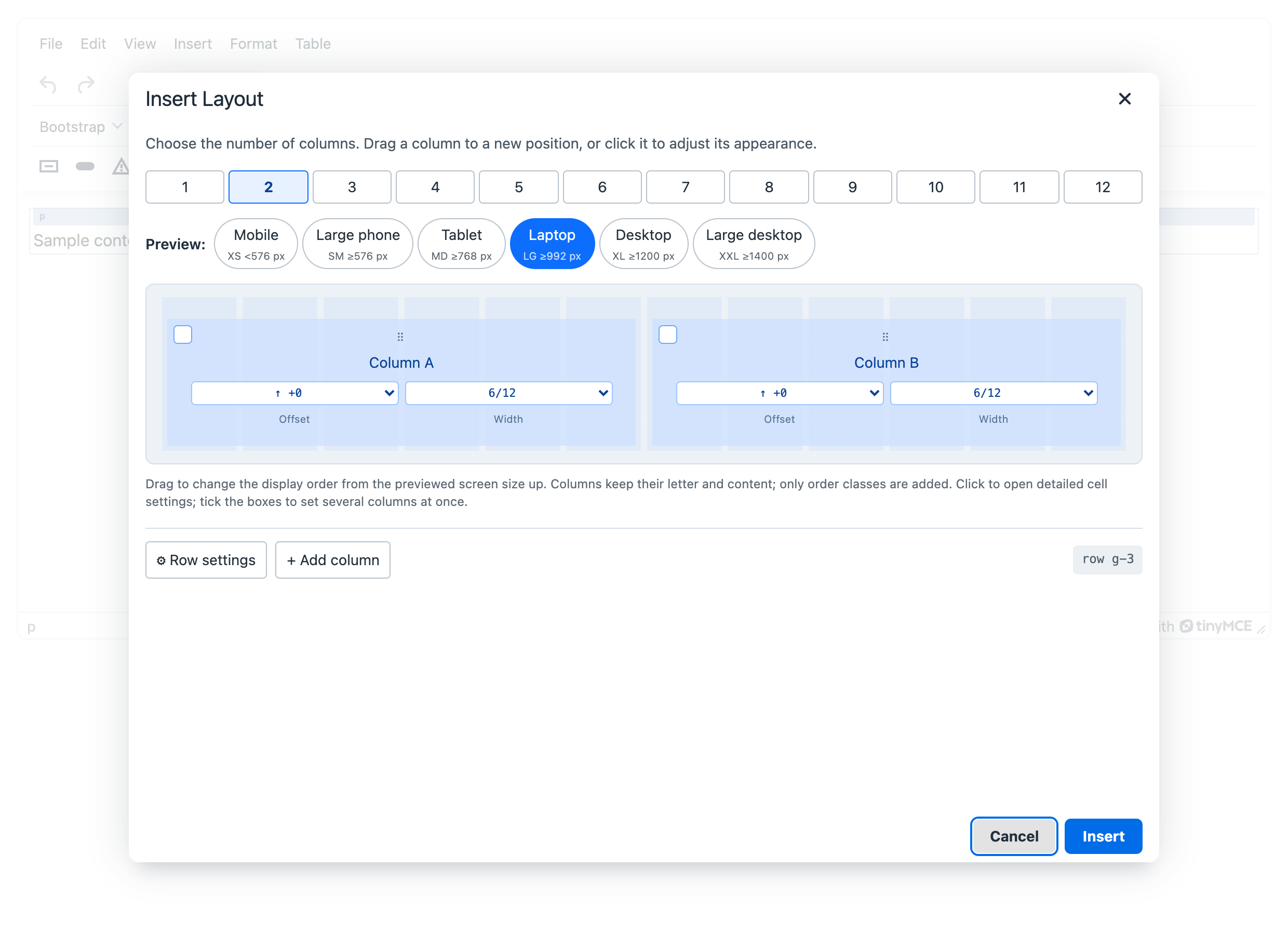
Grid designer
Insert layout opens the grid designer: choose the number of columns, drag columns to reorder them, click a column for its settings (width per breakpoint, offset, text and content alignment) and open Row settings for gutters, columns per row and alignment.
Columns are named A, B, C… by their position in the HTML. Dragging never moves the HTML: it adds order-* classes from the previewed breakpoint up, so a column can come first on desktop and stay in place on mobile. The plugin writes as few classes as possible. Original order shows up whenever the order differs from the HTML and returns it to A, B, C… at that breakpoint. Bootstrap 5 has eight order steps (order-first, order-0 to order-5, order-last); an order that cannot be written with them is refused. To really move a column, use Move left or Move right on its toolbar.
The column count applies to all breakpoints. Clicking a number sets predefined widths for every column: 2 → col-12 col-lg-6, 3 → col-12 col-lg-4, 4 → col-12 col-md-6 col-lg-3 and so on. Columns stack on mobile and sit side by side on desktop. Alignment, order and custom classes are kept.
To keep manually set widths, use + Add column. The new column is added at the end with the same widths as the last column. The other columns stay unchanged. A row can contain up to 12 columns.
Each column has two dropdowns for the selected breakpoint: offset (+2 → offset-lg-2) and width in twelfths (6/12 → col-lg-6). The ↑ symbol marks a value inherited from a smaller breakpoint. The twelve-part grid in the background helps you compare widths. Use bootstrapui_grid_defaults to change the predefined sets.
Rows and columns get their own context toolbar: add, edit, duplicate, move and remove. Select row or column walks up nested grids. Show layout outlines draws the structure in the editing area without touching the saved HTML.
The output is standard .container, .row, .col-* markup.
With bootstrapui_version: '4' the designer does not offer gutters (g-*), row-cols-auto or the xxl breakpoint; columns per row go from 1 to 6.